Step 1: Install Required Packages
Why: Installs Apache, PHP, and PHP-FPM (the fast process manager).
# Update package lists
sudo apt update

# Install software-properties-common (needed to add PPAs)
sudo apt install software-properties-common apt-transport-https -y

# Add Ondřej Surý's PPA for latest Apache
sudo add-apt-repository ppa:ondrej/apache2 -y

# Add Ondřej Surý's PPA for latest PHP (if not already added)
sudo add-apt-repository ppa:ondrej/php -y

# Update again to include the new repositories
sudo apt update

# Install Apache and PHP with extensions
sudo apt install apache2 php8.3 php8.3-fpm php8.3-common php8.3-mysql \
    php8.3-xml php8.3-curl php8.3-gd php8.3-mbstring php8.3-zip \
    php8.3-bcmath php8.3-intl php8.3-soap php8.3-opcache -y

# Enable required Apache modules for PHP-FPM (if using FPM)
sudo a2enmod proxy_fcgi setenvif
sudo a2enconf php8.3-fpm

# Restart Apache
sudo systemctl restart apache2
After install add this end of the apache2.conf in the /etc/apache2
# ----------------------------------------------------------------------
# MP4 Streaming Optimizations (Safe for Prefork + mod_php)
# ----------------------------------------------------------------------

# Use kernel-level file sending (critical for video)
EnableSendfile On

# Keep connections open for seeking
MaxKeepAliveRequests 0
KeepAliveTimeout 15

# Skip ETag calculation for static files
FileETag None

# Don't compress video files (they're already compressed)
<IfModule mod_deflate.c>
    SetEnvIfNoCase Request_URI \.mp4$ no-gzip dont-vary
</IfModule>

# Browser caching for videos
<IfModule mod_expires.c>
    ExpiresActive On
    ExpiresByType video/mp4 "access plus 1 month"
</IfModule>

# Skip logging video requests (saves disk I/O)
SetEnvIf Request_URI "\.mp4$" dontlog
To restart both php and apache
sudo systemctl restart php8.3-fpm
sudo systemctl restart apache2
Step 2: Enable Apache Modules
Why: Activates features for caching, compression, URL rewriting, SSL, and PHP-FPM connection.
sudo a2enmod headers expires rewrite ssl proxy proxy_fcgi setenvif
Step 3: Switch from Prefork to Event MPM
Why: Prefork = 1 process per user (slow, memory heavy). Event = 1 process handles many users (fast, efficient for streaming).
sudo a2dismod php8.3
sudo a2dismod mpm_prefork
sudo a2enmod mpm_event
sudo a2enconf php8.3-fpm
After that it is a good idea to setup the mpm_worker.conf in the /etc/apache2/mods-enabled
StartServers            3
MinSpareThreads         64
MaxSpareThreads         128
ThreadLimit             64
ThreadsPerChild         64
MaxRequestWorkers       256
MaxConnectionsPerChild  1000
Step 4: Start PHP-FPM
Why: PHP-FPM runs separately from Apache. Must be running or PHP won’t work.
sudo systemctl enable php8.3-fpm
sudo systemctl start php8.3-fpm
/etc/php/8.3/apache2/php.ini- Used when PHP runs as an Apache module (mod_php)
- Handles PHP via Apache directly
/etc/php/8.3/fpm/php.ini- Used when PHP runs via PHP-FPM (FastCGI Process Manager)
- Handles PHP as a separate process that Apache communicates with
Step 5: Add Streaming Optimizations to /etc/apache2/apache2.conf
Why: Makes video streaming faster by using kernel-level file transfer, keeping connections open for seeking, and skipping unnecessary processing.
This stuff needed if you plan to stream high-concurrent videos like me or it can be ignored.
# Kernel sends file directly to network (bypasses Apache buffer)
EnableSendfile On

# Keeps connection open so user can seek without reconnecting
MaxKeepAliveRequests 0
KeepAliveTimeout 15

# Skips unnecessary file checksum calculation
FileETag None

# MP4 is already compressed, don't waste CPU compressing again
<IfModule mod_deflate.c>
    SetEnvIfNoCase Request_URI \.mp4$ no-gzip dont-vary
</IfModule>

# Tells browser to cache videos for 1 month
<IfModule mod_expires.c>
    ExpiresActive On
    ExpiresByType video/mp4 "access plus 1 month"
</IfModule>

# Stops logging every video chunk request (saves disk I/O)
SetEnvIf Request_URI "\.mp4$" dontlog
CustomLog ${APACHE_LOG_DIR}/access.log combined env=!dontlog
Step 6: Virtual Host PHP Handler
Why: Tells Apache to send PHP files to PHP-FPM instead of trying to process them itself.
<FilesMatch \.php$>
    SetHandler "proxy:unix:/run/php/php8.3-fpm.sock|fcgi://localhost"
</FilesMatch>
Step 7: Restart Everything
Why: Applies all changes.
sudo systemctl restart php8.3-fpm
sudo systemctl restart apache2
Step 8: Verify
Why: Confirms everything is working.
apachectl -V | grep -i mpm
sudo systemctl status php8.3-fpm
Extras:
Install btop and iftop to watch resources and network use easier.
apt install iftop
btop need couple steps read their install docs
https://github.com/aristocratos/btop?tab=readme-ov-file#with-cmake-community-maintained
Disable gzip for videos since they are already encoded and compressed VirtualHost setup.
Disable logs since every network log will eat the I/O resource that server needs.
For security to block hotlinking and not allowing people t odownload your videos easily.
Headers setup in the vhost or in the cloudflare.
Header always set Access-Control-Allow-Origin "https://yoursite.com"
Header always set Access-Control-Allow-Methods "GET, HEAD, OPTIONS"
Header always set Access-Control-Allow-Headers "Content-Type, Range, Accept-Encoding"
Header always set Access-Control-Expose-Headers "Content-Length, Content-Range, Accept-Ranges"
Header always set Access-Control-Allow-Credentials "true"
BONUS: Edge Delivery with Cloudflare R2, Security and Scalability
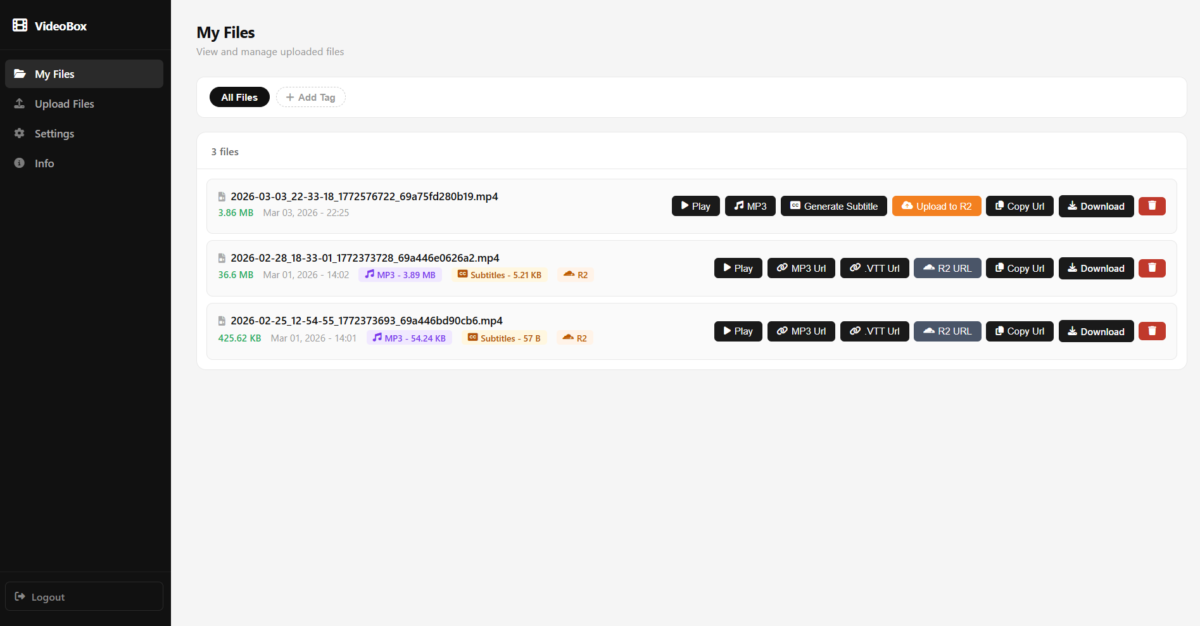
On top of the extremely optimized server i build i created a simple dashboard to handle the files.
Upload, Encode MP3 with ffmpeg and php, whisper implementation for the subtitle generations and implemented Cloudflare R2 to sync my files and use the edge url instead of the soruce url.
I was first planning to start with the server url as a source on the edge but the issue is both speed and performance scalbility is limited. Even though i have giant server and unmetered 200 mbt/s server when it comes to video delivery no limit server or port limit can handle some of the peak concurrent times. After that i decided on as extra layer continuing with R2 CDN is way to go.
On my setup i still need the server since ffmpeg encoding and ai generations and file management dashboard everything is in same place and very easy to use. Solving all of this on cloudflare or any cloud is just way too many different tool and service and it is just not nesseray and it will end up crazy expensive video encoding can be more expensive than the video delivery itself 🙂
With this setup cloudflare r2 will handle the concurrent extreme peak visitor numbers and the vps will handle the everything else. Perfect stack for media delivery setup… 😎