Just paste this to console and it will download all the .webp images in the current page as a one zip file. It is possible to change .webp to anything else really.
In default chrome doesn’t allow code pasting write allow pasting and then it will work.
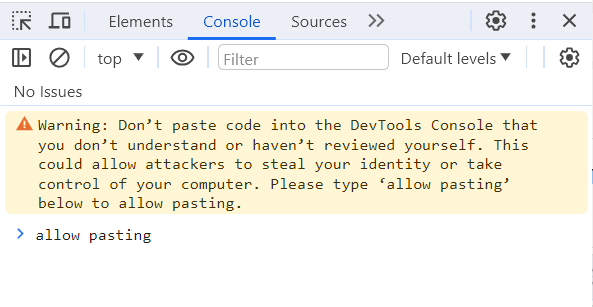
This should work for firefox too but didn’t tested it.
Enjoy
// Create a script element to load JSZip
var script = document.createElement('script');
script.src = 'https://cdnjs.cloudflare.com/ajax/libs/jszip/3.10.1/jszip.min.js';
document.head.appendChild(script);

script.onload = function() {
  (async function() {
    // Get all resource entries
    const resources = performance.getEntriesByType('resource');

    // Filter for JSON files
    const jsonResources = resources.filter(resource => {
      const url = resource.name.split('?')[0]; // Remove query params
      return url.endsWith('.webp');
    });

    // Extract unique URLs
    const urls = [...new Set(jsonResources.map(resource => resource.name))];

    // Create a new JSZip instance
    const zip = new JSZip();

    // For each URL, fetch the content and add to zip
    const fetchPromises = urls.map(async url => {
      try {
        const response = await fetch(url);
        if (!response.ok) {
          console.error(`Failed to fetch ${url}`);
          return;
        }
        const data = await response.blob();
        // Extract filename from URL
        const urlParts = url.split('/');
        const filename = urlParts[urlParts.length - 1].split('?')[0];
        // Add the file to the zip
        zip.file(filename, data);
      } catch (error) {
        console.error(`Error fetching ${url}:`, error);
      }
    });

    // Wait for all fetches to complete
    await Promise.all(fetchPromises);

    // Generate the zip file and trigger download
    zip.generateAsync({ type: 'blob' }).then(function(content) {
      const link = document.createElement('a');
      link.href = URL.createObjectURL(content);
      link.download = 'files.zip';
      document.body.appendChild(link);
      link.click();
      document.body.removeChild(link);
    });
  })();
};