This code replaces WooCommerce variation dropdowns with buttons, and adds JavaScript to handle button clicks for variation selection.
Enjoy 😉
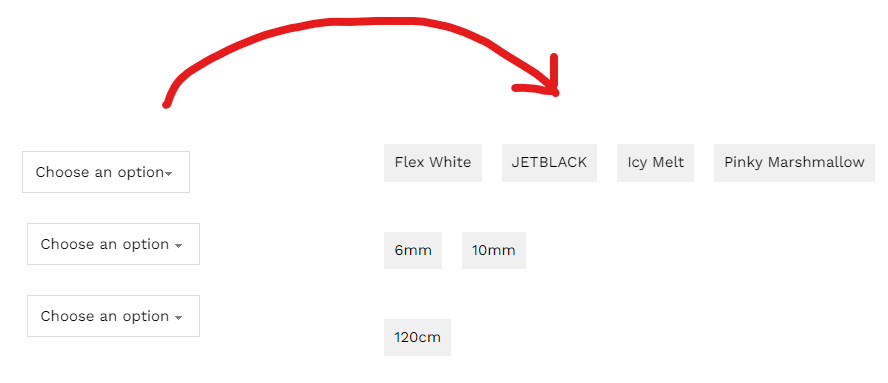
/**
* Replaces WooCommerce variation dropdowns with buttons, and adds JavaScript to handle button clicks for variation selection.
*/

function wc_custom_variation_buttons( $html, $args ) {
    $attribute = $args['attribute'];
    $product = $args['product'];
    $options = $args['options'];
    $id = esc_attr( $args['id'] );
    $class = esc_attr( $args['class'] );
    $selected_value = isset($args['selected']) ? $args['selected'] : '';

    if ( empty( $options ) && ! empty( $product ) && ! empty( $attribute ) ) {
        $attributes = $product->get_variation_attributes();
        $options = $attributes[$attribute];
    }

    if ( ! empty( $options ) ) {
        $html = '<div class="custom-variation-buttons" data-attribute_name="attribute_' . esc_attr( $attribute ) . '">';
        foreach ( $options as $option ) {
            $selected_class = (sanitize_title($selected_value) == $option) ? 'selected' : '';
            $html .= '<button type="button" class="button-attribute ' . $selected_class . '" data-value="' . esc_attr( $option ) . '">' . esc_html( wc_attribute_label($option) ) . '</button>';
        }
        $html .= '</div>';
    }

    return $html;
}
add_filter( 'woocommerce_dropdown_variation_attribute_options_html', 'wc_custom_variation_buttons', 20, 2 );

function wc_custom_variation_button_script() {
    ?>
    <script type="text/javascript">
        document.addEventListener('DOMContentLoaded', function() {
            var buttonGroups = document.querySelectorAll('.custom-variation-buttons');

            buttonGroups.forEach(function(group) {
                var buttons = group.querySelectorAll('.button-attribute');
                var attributeName = group.getAttribute('data-attribute_name');
                var selectElement = document.querySelector('select[name="'+attributeName+'"]');

                buttons.forEach(function(button) {
                    button.addEventListener('click', function() {
                        buttons.forEach(function(btn) {
                            btn.classList.remove('selected');
                        });

                        button.classList.add('selected');
                        var value = button.getAttribute('data-value');
                        selectElement.value = value;
                        var event = new Event('change');
                        selectElement.dispatchEvent(event);
                    });
                });
            });
        });
    </script>
    <?php
}
add_action( 'wp_footer', 'wc_custom_variation_button_script' );
After selection buttons gets “selected” class and the class can be selected to style the selected buttons for visual feedback.
example css: .selected {backgroud:red}
Not work after newest updates, why?
I will update this code when woocommerce code becomes stable again they are making lots of breaking changes these days.
here you can use this free plugin if you want as an alternative
https://wordpress.org/plugins/woo-variation-swatches/