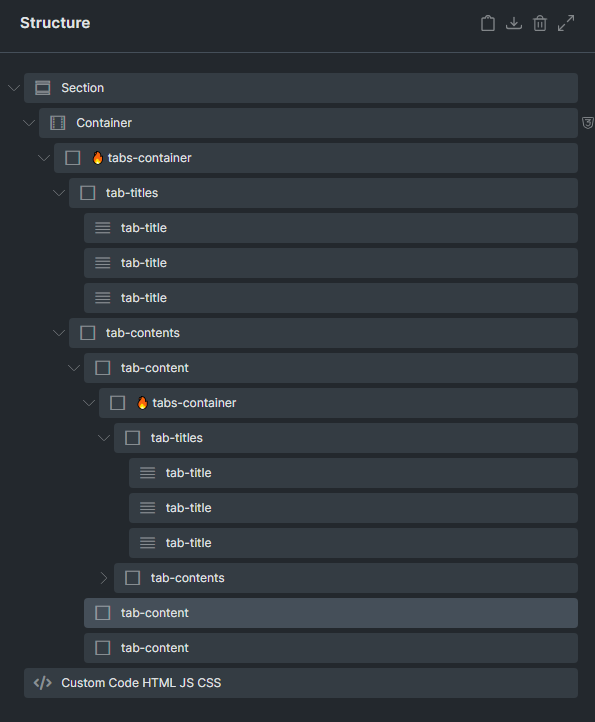
The JS finds each .tabs-container, then inside it selects .tab-titles and .tab-contents. From these, it gets .tab-title elements (the clickable tabs) and .tab-content elements (the content panels). Clicking a .tab-title activates that tab by toggling .active on titles and .hidden on contents, showing the correct content. The first tab is active by default. Nested .tabs-container groups work independently because each container is initialized separately.
Adds .hidden to the hidden parts so add display:none to .hidden css selection.
    <script>
        document.addEventListener('DOMContentLoaded', function() {

            /**
             * Initializes a single tab group based on its container.
             * It finds all titles and contents that are DIRECT children and wires them up.
             * @param {HTMLElement} tabContainer - The .tabs-container element.
             */
            function initializeTabs(tabContainer) {
                // Find title and content elements using more specific selectors.
                // ':scope' refers to the 'tabContainer' element itself.
                // This ensures we only get the direct children of the container's
                // '.tab-titles' and '.tab-contents' wrappers, ignoring any nested tabs.
                const titles = tabContainer.querySelectorAll(':scope > .tab-titles > .tab-title');
                const contents = tabContainer.querySelectorAll(':scope > .tab-contents > .tab-content');

                if (titles.length !== contents.length) {
                    console.error("Mismatch between tab titles and content panels.", tabContainer);
                    return;
                }

                /**
                 * Switches the visible tab to the one at the specified index.
                 * @param {number} activeIndex - The index of the tab to show.
                 */
                function switchTab(activeIndex) {
                    titles.forEach((title, index) => {
                        title.classList.toggle('active', index === activeIndex);
                    });
                    contents.forEach((content, index) => {
                        content.classList.toggle('hidden', index !== activeIndex);
                    });
                }

                // Add a click event listener to each tab title
                titles.forEach((title, index) => {
                    title.addEventListener('click', () => {
                        switchTab(index);
                    });
                });

                // --- INITIALIZE ---
                // Programmatically set the first tab (index 0) as active on load.
                switchTab(0);
            }

            // --- Main Execution ---
            // Find all tab containers on the page and initialize each one independently.
            // The script will run on the outer container first, then on the inner one.
            const allTabContainers = document.querySelectorAll('.tabs-container');
            allTabContainers.forEach(initializeTabs);

        });
    </script>