This code is adding a metabox under the post editor. You can generate dall-e-3 image with it.
If you like the image just copy/paste the image to block editor, editor will save it to the media library and you can select it as a featured image or use anywhere else.
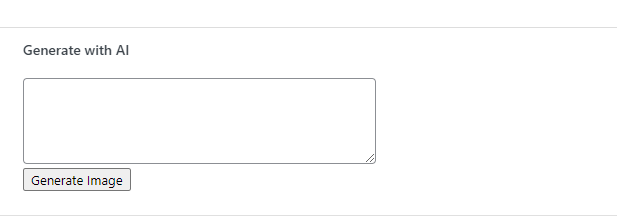
// Add a new metabox to the 'post' post type
function add_ai_generate_metabox() {
    add_meta_box(
        'ai_generate_metabox',         // ID of the metabox
        'Generate with AI',            // Title of the metabox
        'ai_generate_metabox_content', // Callback function to output content
        'post',                        // Post type
        'normal',                      // Context where to show
        'high'                         // Priority of the metabox
    );
}

// This function outputs the content of the metabox
function ai_generate_metabox_content($post) {
    // Display a textarea and a button inside the metabox
    echo '<textarea id="ai-prompt" rows="4" cols="50"></textarea><br>';
    echo '<button id="generate-image">Generate Image</button>';
    echo '<div id="image-result"></div>'; // Container to display the generated image

    // Inline JavaScript
    ?>
    <script type="text/javascript">
    document.getElementById('generate-image').addEventListener('click', function() {
        var prompt = document.getElementById('ai-prompt').value;
        var openAIKey = 'youropenai-key'; // Replace with your actual OpenAI API key

        fetch('https://api.openai.com/v1/images/generations', {
            method: 'POST',
            headers: {
                'Content-Type': 'application/json',
                'Authorization': `Bearer ${openAIKey}`
            },
            body: JSON.stringify({
                model: 'dall-e-3',
                prompt: prompt,
                n: 1,
                size: '1024x1024'
            })
        })
        .then(response => response.json())
        .then(data => {
            var imageUrl = data.data[0].url; // Assuming the API response contains the image URL
            document.getElementById('image-result').innerHTML = '<img src="' + imageUrl + '" alt="Generated Image">';
        })
        .catch(error => console.error('Error:', error));
    });
    </script>
    <?php
}

// Hook into the 'add_meta_boxes' action to add the metabox
add_action('add_meta_boxes', 'add_ai_generate_metabox');
Recently made this code for our agency geopard digital client.