Some SNN-BRX strings cannot be scanned from the Theme and plugins localization on the WPML.
Because of that we need to register some of the SNN-BRX Strings from the Custom XML Configuration.
Just go the xml setting and copy paste the xml string list thats it. After that strings will shoew up on the String Translation setting and can be translated.
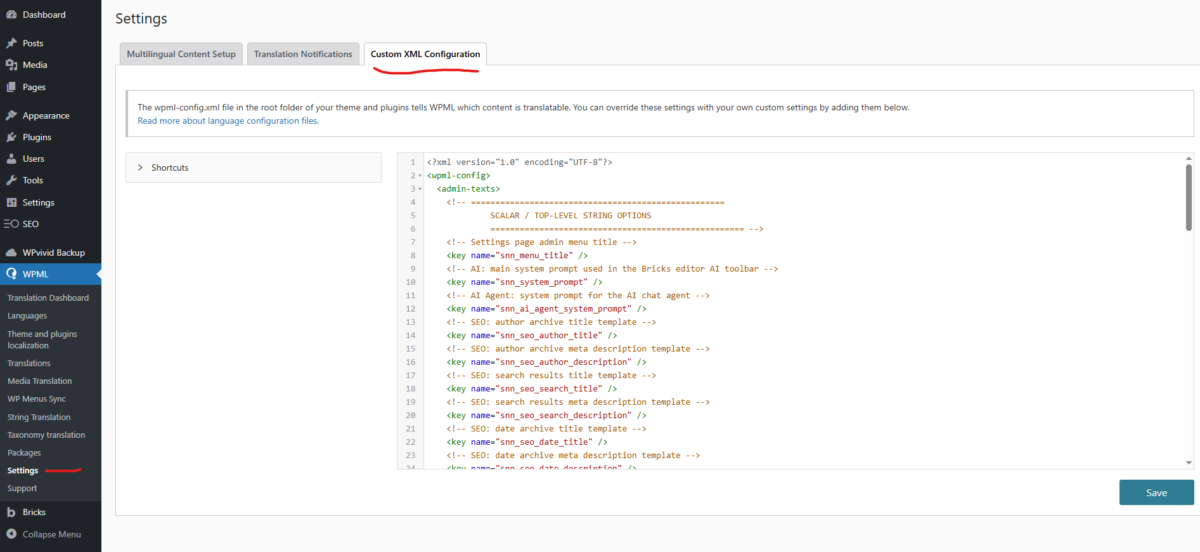
<?xml version="1.0" encoding="UTF-8"?>
<wpml-config>
    <admin-texts>

        <!-- ====================================================
             SCALAR / TOP-LEVEL STRING OPTIONS
             ==================================================== -->

        <!-- Settings page admin menu title -->
        <key name="snn_menu_title" />

        <!-- AI: main system prompt used in the Bricks editor AI toolbar -->
        <key name="snn_system_prompt" />

        <!-- AI Agent: system prompt for the AI chat agent -->
        <key name="snn_ai_agent_system_prompt" />

        <!-- SEO: author archive title template -->
        <key name="snn_seo_author_title" />

        <!-- SEO: author archive meta description template -->
        <key name="snn_seo_author_description" />

        <!-- SEO: search results title template -->
        <key name="snn_seo_search_title" />

        <!-- SEO: search results meta description template -->
        <key name="snn_seo_search_description" />

        <!-- SEO: date archive title template -->
        <key name="snn_seo_date_title" />

        <!-- SEO: date archive meta description template -->
        <key name="snn_seo_date_description" />

        <!-- SEO: 404 page title template -->
        <key name="snn_seo_404_title" />

        <!-- SEO: 404 page meta description template -->
        <key name="snn_seo_404_description" />

        <!-- SEO: custom robots.txt content -->
        <key name="snn_seo_robots_txt_content" />

        <!-- Login settings: custom text block shown on the login page -->
        <key name="ls_login_custom_text" />

        <!-- ====================================================
             SEO: PER-POST-TYPE / PER-TAXONOMY TITLE & DESCRIPTION
             Arrays keyed by post-type / taxonomy slug
             ==================================================== -->

        <key name="snn_seo_post_type_titles">
            <key name="*" />
        </key>

        <key name="snn_seo_post_type_descriptions">
            <key name="*" />
        </key>

        <key name="snn_seo_archive_titles">
            <key name="*" />
        </key>

        <key name="snn_seo_archive_descriptions">
            <key name="*" />
        </key>

        <key name="snn_seo_taxonomy_titles">
            <key name="*" />
        </key>

        <key name="snn_seo_taxonomy_descriptions">
            <key name="*" />
        </key>

        <!-- ====================================================
             COOKIE BANNER  (option: snn_cookie_settings_options)
             ==================================================== -->

        <key name="snn_cookie_settings_options">
            <key name="snn_cookie_settings_preferences_title" />
            <key name="snn_cookie_settings_banner_description" />
            <key name="snn_cookie_settings_additional_description" />
            <key name="snn_cookie_settings_accept_button" />
            <key name="snn_cookie_settings_deny_button" />
            <key name="snn_cookie_settings_preferences_button" />
            <key name="snn_cookie_settings_iframe_block_text" />

            <key name="snn_cookie_settings_services">
                <key name="*">
                    <key name="name" />
                    <key name="description" />
                </key>
            </key>

            <key name="snn_cookie_settings_blocked_scripts">
                <key name="*">
                    <key name="name" />
                    <key name="description" />
                </key>
            </key>
        </key>

        <!-- ====================================================
             MAIL CUSTOMIZER  (option: snn_mail_customizer_settings)
             ==================================================== -->

        <key name="snn_mail_customizer_settings">
            <key name="sender_name" />
            <key name="body_content" />
        </key>

        <!-- ====================================================
             AI ACTION PRESETS  (option: snn_ai_action_presets)
             Repeater: [{name, prompt}, …]
             ==================================================== -->

        <key name="snn_ai_action_presets">
            <key name="*">
                <key name="name" />
                <key name="prompt" />
            </key>
        </key>

        <!-- ====================================================
             OTHER SETTINGS  (option: snn_other_settings)
             Only the dashboard custom metabox content is text
             ==================================================== -->

        <key name="snn_other_settings">
            <key name="dashboard_custom_metabox_content" />
        </key>

    </admin-texts>
</wpml-config>