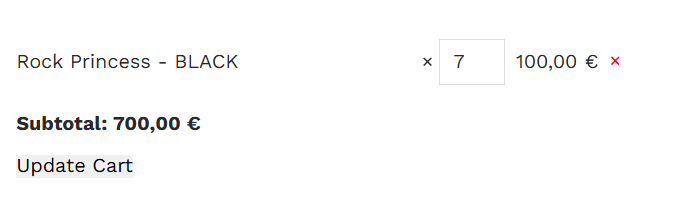
If you need t oadd mini cart anywhere you want this shortcode may sovle your problem.
/**
 * 		[snn_simple_woocommerce_cart]
 *
 * Shortcode to display simple WooCommerce cart contents with quantity update and item removal.
 * This version shows a list of cart items including:
 * - Product name (with link if available)
 * - A number input to change the quantity
 * - Price display
 * - A removal (X) button to delete the item from the cart.
 */

function snn_display_simple_woocommerce_cart_contents() {
    // Ensure WooCommerce is active
    if ( ! class_exists( 'WooCommerce' ) ) {
        return '<p>WooCommerce is not active.</p>';
    }

    // Recalculate totals to ensure the cart values are up to date
    WC()->cart->calculate_totals();

    ob_start();
    echo '<form action="" method="post">';

    if ( WC()->cart->is_empty() ) {
        echo '<p>Your cart is currently empty.</p>';
    } else {
        echo '<ul class="woocommerce-cart-contents" style="list-style-type: none; padding: 0;">';

        // Loop through each cart item
        foreach ( WC()->cart->get_cart() as $cart_item_key => $cart_item ) {
            $product           = $cart_item['data'];
            $product_name      = $product->get_name();
            $quantity          = $cart_item['quantity'];
            $product_price     = wc_price( $product->get_price() );
            $product_permalink = $product->is_visible() ? $product->get_permalink() : '';

            echo '<li class="woocommerce-cart-item" style="margin-bottom: 10px; display: flex; align-items: center;">';

            // Product name with optional link
            if ( $product_permalink ) {
                echo '<a href="' . esc_url( $product_permalink ) . '" style="flex: 1;">' . esc_html( $product_name ) . '</a>';
            } else {
                echo '<span style="flex: 1;">' . esc_html( $product_name ) . '</span>';
            }
crazy simple