This code adds a custom template code functionality to the Bricks Builder settings page and enables dynamic rendering of the {template_code} tag within page content. It consists of three main steps:
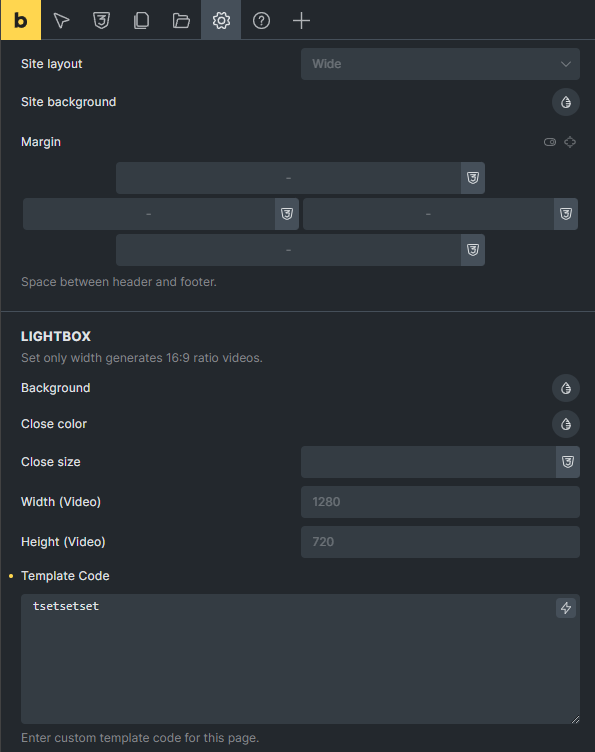
Adding a ‘template_code’ field to the builder’s page settings. It is unfiltered so you can add code or text it can be anything.
Registering the {template_code} as a dynamic tag in Bricks Builder.
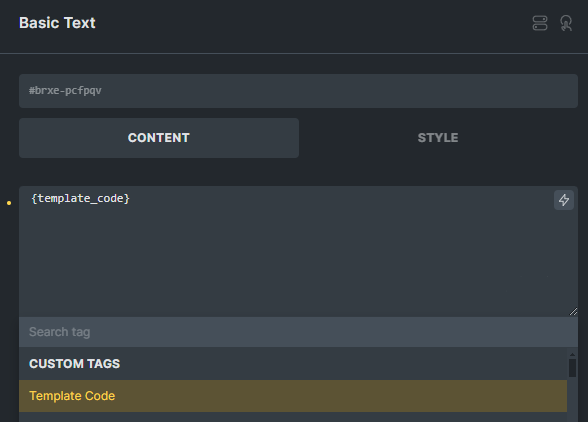
Rendering and injecting the template code within the page content using the dynamic tag.
/*
This code adds a custom template code functionality to the Bricks Builder settings page and enables dynamic rendering of the {template_code} tag within page content. It consists of three main steps:
1. Adding a 'template_code' field to the builder's page settings.
2. Registering the {template_code} as a dynamic tag in Bricks Builder.
3. Rendering and injecting the template code within the page content using the dynamic tag.
*/

add_filter( 'builder/settings/page/controls_data', function( $data ) {
    if ( isset( $data['controlGroups']['general'] ) ) {
        $data['controls']['template_code'] = [
            'group'       => 'general',
            'type'        => 'textarea',
            'label'       => esc_html__( 'Template Code', 'bricks' ),
            'description' => esc_html__( 'Enter custom template code for this page.', 'bricks' ),
            'placeholder' => esc_html__( 'Add your template code here', 'bricks' ),
        ];
    }
    return $data;
});

add_filter( 'bricks/dynamic_tags_list', 'register_template_code_tag' );
function register_template_code_tag( $tags ) {
    $tags[] = [
        'name'  => '{template_code}',
        'label' => 'Template Code',
        'group' => 'Custom Tags',
    ];
    return $tags;
}

add_filter( 'bricks/dynamic_data/render_tag', 'render_template_code_tag', 10, 3 );
function render_template_code_tag( $tag, $post, $context = 'text' ) {
    if ( $tag !== 'template_code' ) {
        return $tag;
    }
    $page_settings = get_post_meta( $post->ID, '_bricks_page_settings', true );
    if ( $page_settings ) {
        $data = maybe_unserialize( $page_settings );
        if ( isset( $data['template_code'] ) ) {
            return  $data['template_code'];
        }
    }
    return 'No Template Code Found';
}

add_filter( 'bricks/dynamic_data/render_content', 'render_template_code_tag_in_content', 10, 3 );
function render_template_code_tag_in_content( $content, $post, $context = 'text' ) {
    if ( strpos( $content, '{template_code}' ) !== false ) {
        $template_code = render_template_code_tag( 'template_code', $post, $context );
        $content = str_replace( '{template_code}', $template_code, $content );
    }
    return $content;
}
Wowzerz! That is one beautiful setup you have created with this, Thanks.
Btw. Check out Sinanisler’s Bricks child theme also.